Connecting your wallet is one of the first real actions you will take in crypto especially if you self custody. It can also be one of the first places beginners make avoidable mistakes. This guide is not about what coin to buy neither is it about trading. It is not about chasing airdrops, mints, staking rewards, or hype. This guide is about one thing: *What to ensure you have set up before you connect your wallet to any crypto website, app, link, claim page, or tool.* The goal is simple: *Do not blindly connect.* A wallet connection may seem harmless, but it can lead to signature requests, token approvals, fake transactions, malicious permissions, or phishing traps. Sometimes it is the first step in a scam. Before you connect, use this guide. **Do Not Connect Your Main Wallet First** Your main wallet should not be the wallet you use for learning, testing, claiming, minting, experimenting, or connecting to unfamiliar websites. As a recommendation, your first set of actions should just be to on/offramp cash. Use separate wallets for separate purposes. 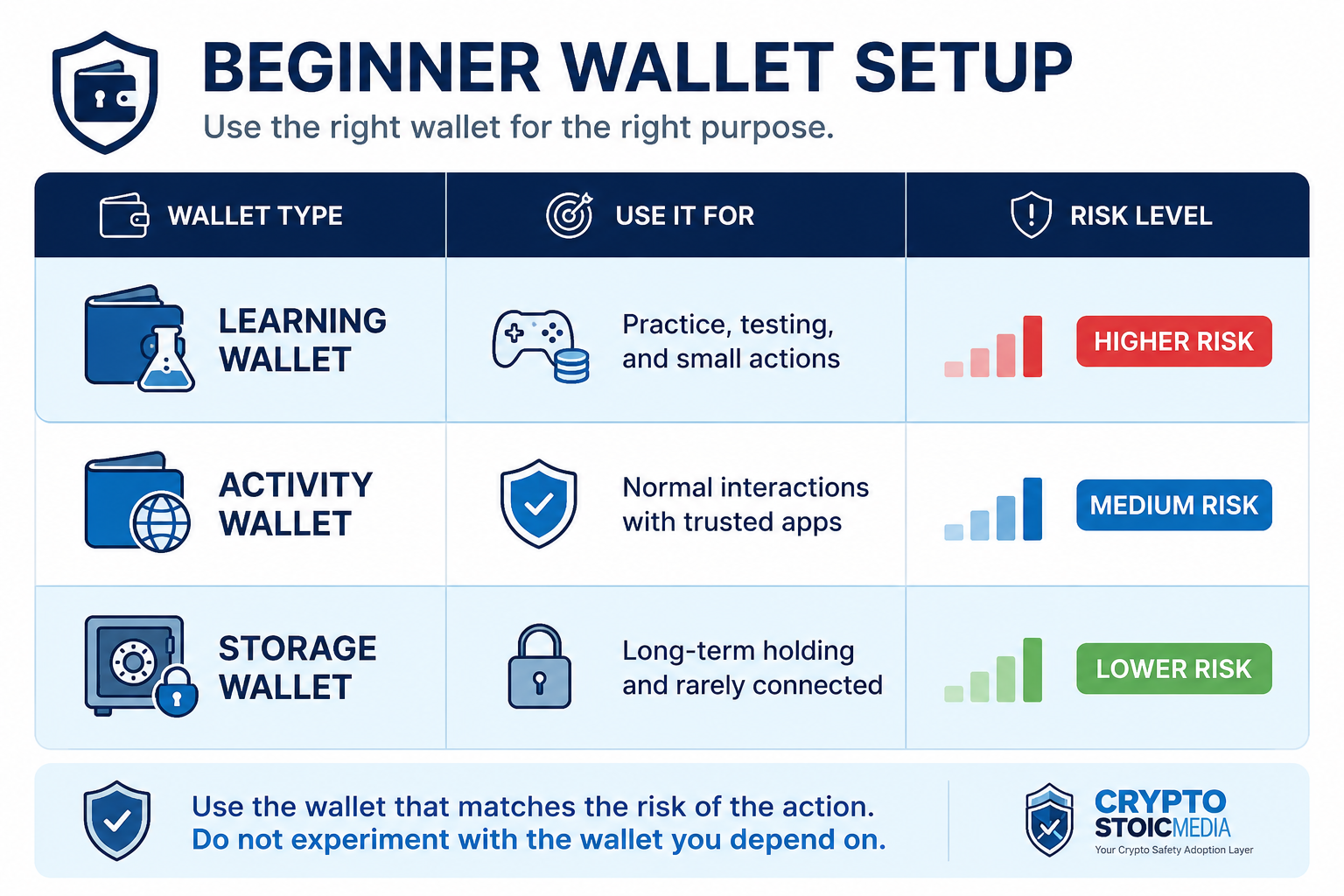 *The wallet I experiment with should not be the wallet I depend on.* **1: Verify the Website** Before you connect, verify that you are on the correct website. Fake crypto websites can look nearly identical to real ones. Scammers use misspelled domains, fake search results, fake ads, fake support links, and fake social media posts. **Check this before connecting:** - *Did I type the URL myself? - Did I avoid sponsored search results? - Did I check the spelling of the domain? - Did I confirm the link from an official source? - Did I avoid links from DMs or random comments? - Did I bookmark the verified website?* Use the bookmark next time. Do not search for the site every time. That increases the chance of clicking a fake ad or copycat domain. **2: Avoid Wallet Links From DMs** Do not connect your wallet through links sent in private messages. This includes: Discord DMs, Telegram DMs, X/Twitter DMs, WhatsApp messages, “Admin” messages, “Urgent claim” links etc. *If someone says they are support and sends you a wallet connection link, assume it is unsafe. Real support should never need your seed phrase, private key, or a random wallet connection through a private link.* **3: Know Why You Connect** Before connecting your wallet, know the purpose. Do not connect just because a website asks. Ask: *Why does this site need my wallet? What am I trying to do? Is this required for the action? Am I just browsing, or am I about to approve something? Do I understand what happens after I connect?* If you are only reading information, a wallet connection should usually not be necessary. If you do not know why the site needs your wallet, do not connect yet. **New to crypto? Do not connect blindly. Join** [Safe Crypto Onboarding](https://cryptostoicmedia.com/#pricing) **and learn with guardrails.** [](https://cryptostoicmedia.com/) **4: Check the Wallet You Are Using** Before you click connect, confirm which wallet is active. Many beginners accidentally connect the wrong wallet because their browser wallet defaults to the last wallet they used. **Before connecting, check:** *1. Am I using my learning wallet? 1. Am I using my activity wallet? 1. Am I avoiding my storage wallet? 1. Does this wallet contain only what I am willing to risk? 1. Is this wallet appropriate for this website?* *Storage wallets should rarely connect to websites. Use a smaller, separate wallet for early activity.* **5: Watch What Happens After You Connect** Connecting is not the end, but It is the beginning of the interaction. After you connect, watch for: - Signature requests - Token approvals - Spending permissions - Network switch requests - Transaction confirmations - Unlimited approval requests - Unexpected wallet pop-ups - Requests you do not understand A website may first ask you to connect, then ask you to sign or approve something. That second step is where the danger often increases. *Connect, approve, sign, send each mean different things. Treat them separately. * **6: Use the Pre-Connect Checklist** Before connecting your wallet, run this checklist. Before I connect: *I verified the website. I avoided links from DMs, replies, and random comments. I know why the site needs my wallet. I am using a learning or activity wallet. I am not using my storage wallet. I checked that I am not being rushed. I know what action I plan to take after connecting. I am ready to stop if the next prompt looks unclear. * *If you cannot check every box, do not connect yet.* **Stop Immediately If You See These Red Flags** Stop if the website or person asks you to: *- Enter your seed phrase or private key. - Validate your wallet. - Synchronize or migrate your wallet through a random link. - Connect from a DM link. - Sign something you do not understand. - Approve unlimited spending without explanation. - Act fast before a deadline. - Ignore warnings from your wallet.* Especially stop if you see phrases like: ***support needs access.*** Never forget, when it comes to wallet interactions there is no customer service. The freedom you seek is not at the expense of security. Until you can fully trust AI Agents, wallet security is your responsibility moving forward. The public guide gives you the first layer. The [membership](https://cryptostoicmedia.com/#pricing) gives you the full safety system. [](https://cryptostoicmedia.com/#pricing)