Most beginners assume app stores are safe. That assumption is understandable. Apple’s App Store and Google Play are familiar. People use Apple and Google play stores to download banking apps, productivity tools, games, maps, messaging apps, and everyday services. If an app appears in an official store, many users assume someone has already checked it. That belief can become dangerous in crypto. Scammers use the Bait and Switch technique to bypass approval teams leading to uploading of malicious apps on app stores. Recent crypto scams show that malicious apps can still appear in official app stores. Some impersonate trusted wallets. Some copy names, logos, and interface designs. Some ask users to enter seed phrases. Some redirect users to phishing pages. Others hide malicious code inside apps that appear unrelated to crypto. This is not to create panic, but to make you more intentional and process oriented. You have to verify before installing, restoring, connecting, signing, or sharing recovery information. In crypto, downloading the wrong app can expose your wallet, your seed phrase, private key, or funds. ** 1: Fake Wallet Apps on Apple’s App Store** The Fake Wallet campaign involved fraudulent apps appearing on Apple’s App Store while mimicking popular crypto wallets. The reported fake apps copied the names and visual branding of widely known wallets, such as:* MetaMask, Ledger, Trust Wallet, Coinbase, etc.* The first app did not always look obviously malicious. Some apps used stub functionality, such as simple games, calculators, or task tools, to appear legitimate. Once opened, they redirected users to pages that looked like app-store download pages and pushed them toward trojanized wallet apps. ***The end goal was wallet compromise.*** For*** hot wallets***, the malicious software watched for wallet recovery or creation screens and tried to capture seed phrases. For ***cold-wallet*** users, fake Ledger-style flows tried to get the seed phrase, even though a legitimate hardware wallet setup should not require typing the recovery phrase into a random phone app. 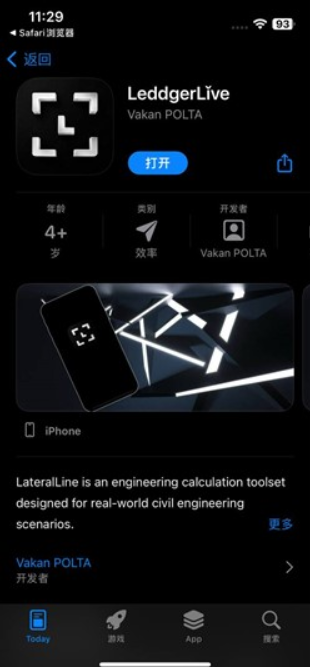 **Clear Red Flags** Watch for: - A wallet app with a familiar logo but a strange developer name - A wallet app that appears through app-store search but is not linked from the official wallet website - An app that redirects you to another “download” page after installation - A request to install a developer profile or configuration profile - A Ledger, hardware-wallet, or cold-wallet app asking for your seed phrase - A wallet app asking you to restore or verify your wallet unexpectedly - A download flow that feels like a loop: install app, open page, download another app **Protection Techniques** Use this process: - Start from the official wallet website, then follow its official App Store link. - Check the developer or publisher name before installing. - Never enter a hardware-wallet seed phrase into a phone app because an app asks for it. - Do not trust app-store search alone for wallet downloads. - If the app redirects you to another download page, stop and verify independently. - For wallet apps, the app store is not the starting point. The official wallet website is. ** 2: Google Play Crypto-Phishing Apps Impersonating DeFi Brands** A separate campaign involved more than[20 malicious apps](https://cyble.com/blog/crypto-phishing-applications-on-the-play-store/) on Google Play Store targeting crypto users by impersonating known DeFi or crypto brands. Reported impersonated names included:* Pancake Swap, Suiet Wallet, Hyperliquid, Raydium, BullX Crypto, Meteora Exchange, SushiSwap etc.* The core tactic was direct: the apps presented fake wallet interfaces and asked users to enter their 12-word mnemonic phrase. That phrase is the recovery key to a wallet. Once a scammer has it, they may be able to restore the wallet elsewhere and drain funds. This campaign also used compromised or repurposed developer accounts. That matters because a developer account may look older or more legitimate than a newly created scam account. 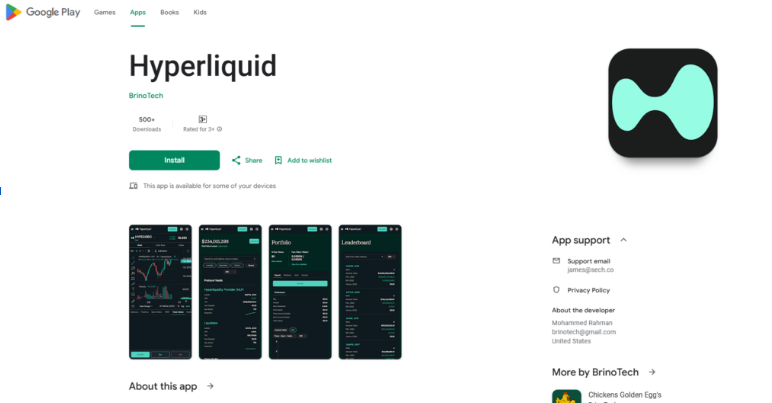 **Clear Red Flags** Watch for: - An app asking for a 12-word mnemonic phrase before showing a usable interface - An app claiming you must restore or import your wallet to access a DeFi platform - A privacy policy hosted on a strange or unrelated domain - Similar app descriptions across multiple unrelated apps - Developer accounts that previously published unrelated games, video tools, or entertainment apps - Apps that imitate famous crypto names but do not match official download links **Protection Techniques** Use this process: 1. Do not enter your 12-word or 24-word recovery phrase into a DeFi app. 1. Verify the official website and documentation before downloading any app linked to a protocol. 1. Check whether the project actually has an official mobile app. Many DeFi protocols are primarily web-based. 1. Treat “restore wallet to access platform” as a severe warning sign. 1. Do not rely on ratings alone. Ratings can be manipulated or inherited through compromised accounts. ***A DeFi app asking for your seed phrase is not helping you connect. It is asking for control.*** 3: **SparkCat — Malware That Looked for Seed Phrase Screenshots** The SparkCat campaign shows a different kind of app-store risk. Instead of simply pretending to be a wallet,[SparkCat-style](https://www.kaspersky.com/about/press-releases/kaspersky-discovers-new-sparkcat-variant-bypassing-app-store-and-google-play-security) malware used optical character recognition, or OCR, to scan images in a user’s phone gallery. The goal was to find screenshots containing crypto wallet recovery phrases. This is important because many beginners make a common mistake: they take a screenshot of their seed phrase during wallet setup because it feels convenient. This creates a serious risk. If malware gains access to the photo gallery and can read text inside images, a seed phrase screenshot can become enough to compromise a wallet. SparkCat was reported in apps distributed through official app stores and other sources. Some infected apps appeared unrelated to crypto, such as food delivery, messaging, or utility-style apps. That means the risk was not limited to obvious crypto apps. **Clear Red Flags** Watch for: - Any app requesting photo-gallery access when it does not clearly need it - Crypto apps asking for broad access to photos or files - Messaging, utility, food delivery, or AI apps requesting permissions that feel excessive - Seed phrase screenshots stored in your gallery - Screenshots of passwords, backup codes, private keys, or sensitive account details - Apps from unknown developers requesting access immediately after installation **Protection Techniques** Use this process: 1. Do not store seed phrase screenshots in your photo gallery. 1. Use a reliable anti-malware 1. Use a password manager as it won't authenticate to a phishing site. 1. Limit photo access permissions on iOS and Android whenever possible. 1. Avoid installing crypto tools, wallet utilities, or “recovery” apps from unknown publishers. 1. Keep recovery information offline, not inside normal photos, notes, messages, or cloud-synced folders. ***Your seed phrase should never live where normal apps can read it.*** Before you install a crypto wallet app, [Download the Starter Kit](https://cryptostoicmedia.com/) [](https://cryptostoicmedia.com/) **The Pattern Behind These Scams** While the names may change, the behavioral patterns stay the same.. FakeWallet, Google Play crypto-phishing apps, and SparkCat are different scams, but they teach the same safety lesson***: normies are often attacked before they understand what they are installing or sharing.*** **The scam may start with:** - A familiar wallet logo - A cloned app listing - A fake DeFi app - A compromised developer account - A harmless-looking utility app - A request for gallery access - A fake wallet restore screen - A seed phrase field **The attacker’s goal is usually one of three things:** - Get your seed phrase or private key - Install malicious wallet software - Gain access to sensitive data stored on your phone **The protection strategy is also consistent:** - Verify the source - Limit permissions - Protect recovery information - Refuse unexpected seed phrase requests - Slow down when an app asks for control **What To Do If You Installed a Suspicious Crypto App** First, stop interacting with it. Do not enter your seed phrase. Do not connect your wallet. Do not approve prompts. Do not follow links inside the app. Do not pay recovery fees. Then consider what happened: If you only installed it: Remove the app and review permissions. If you granted photo or file access: Revoke permissions. Remove sensitive screenshots from your gallery and cloud backups. If you entered a seed phrase or private key: Treat that wallet as compromised. Do not keep using it as if nothing happened. If you connected or approved permissions: Avoid further interactions until you understand what was approved. If someone contacts you offering recovery help. Be careful. Recovery scams often follow the first scam. After one suspicious action, do not rush into a second one. Stop, verify, and get trusted guidance. For everyone, app store safety is not an afterthought, but process driven with safety guardrails. It is one of the first crypto security decisions you make. Fake Wallet shows that cloned wallet apps can appear where users expect safety. Google Play crypto-phishing apps show that fake DeFi brands can ask directly for mnemonic phrases. SparkCat shows that even non-wallet apps can become dangerous if they can access sensitive screenshots. *Do not assume an app is safe because it appears in a familiar app store.* [](https://cryptostoicmedia.com/)