A hardware wallet is designed to keep your private keys away from your computer. But that protection can be defeated if malware convinces you to reveal the recovery phrase yourself. OkoBot is a Windows malware framework with a component called ***SeedHunter.*** It can interfere with legitimate Ledger and Trezor applications and display a fraudulent recovery request inside them. Because the surrounding application may be genuine, the request can look trustworthy. The hardware wallet itself has not necessarily been hacked. The infected computer is being used to deceive the owner. The most important rule is simple: > Never type your complete recovery phrase into a computer because an application, website, pop-up or support representative asks for it. --- ## What is OkoBot? OkoBot is malicious software designed to infect Windows computers. It reportedly spreads through methods such as fake software downloads and “fix this problem” instructions that trick people into running harmful commands. Once installed, OkoBot can add different tools to the infected computer. These tools may monitor activity, steal browser information, record keystrokes or target cryptocurrency wallets. One of those tools is called **SeedHunter.** SeedHunter has a very specific purpose: *it attempts to steal the recovery phrases belonging to Ledger and Trezor hardware wallets.* A recovery phrase—sometimes called a seed phrase or wallet backup—is normally a list of 12, 20 or 24 words. Those words can recreate the wallet and provide access to every account protected by them. This makes the recovery phrase more powerful than: *a PIN, physical hardware wallet, a password or a hard wallet application.* Anyone who obtains the phrase may be able to recreate the wallet on another device. They do not need to steal the original Ledger or Trezor. That is what makes SeedHunter dangerous. It does not necessarily have to break the hardware wallet’s security. It only needs to convince the owner to surrender the wallet’s master backup. *Your recovery phrase should be treated like the master key to your entire wallet—not like an ordinary password.* --- ## How the attack works. The attack begins before the user opens Ledger Live or Trezor Suite. First, the Windows computer becomes infected. This may happen after someone downloads fake software, installs a file from an untrusted source or follows instructions that require copying and running a computer command. After the infection, SeedHunter quietly watches the computer for wallet applications such as Ledger Live or Trezor Suite. When one of those applications opens, the malware interferes with how it operates. In simple terms, it can place a fraudulent page inside the legitimate application. The attacker may then tell SeedHunter to display the page immediately or wait until the user connects an actual hardware wallet. Waiting makes the attack more convincing. Imagine the sequence from the victim’s perspective: 1. You open the real wallet application. 2. You connect your real hardware wallet. 3. The application displays a security or recovery message. 4. The message asks for your recovery phrase. 5. You assume the request must be legitimate because everything else looks normal. But the recovery page is controlled by the malware. If you enter the phrase, SeedHunter captures the words and sends them to the attacker. The attacker can then restore the wallet elsewhere and begin moving the assets. 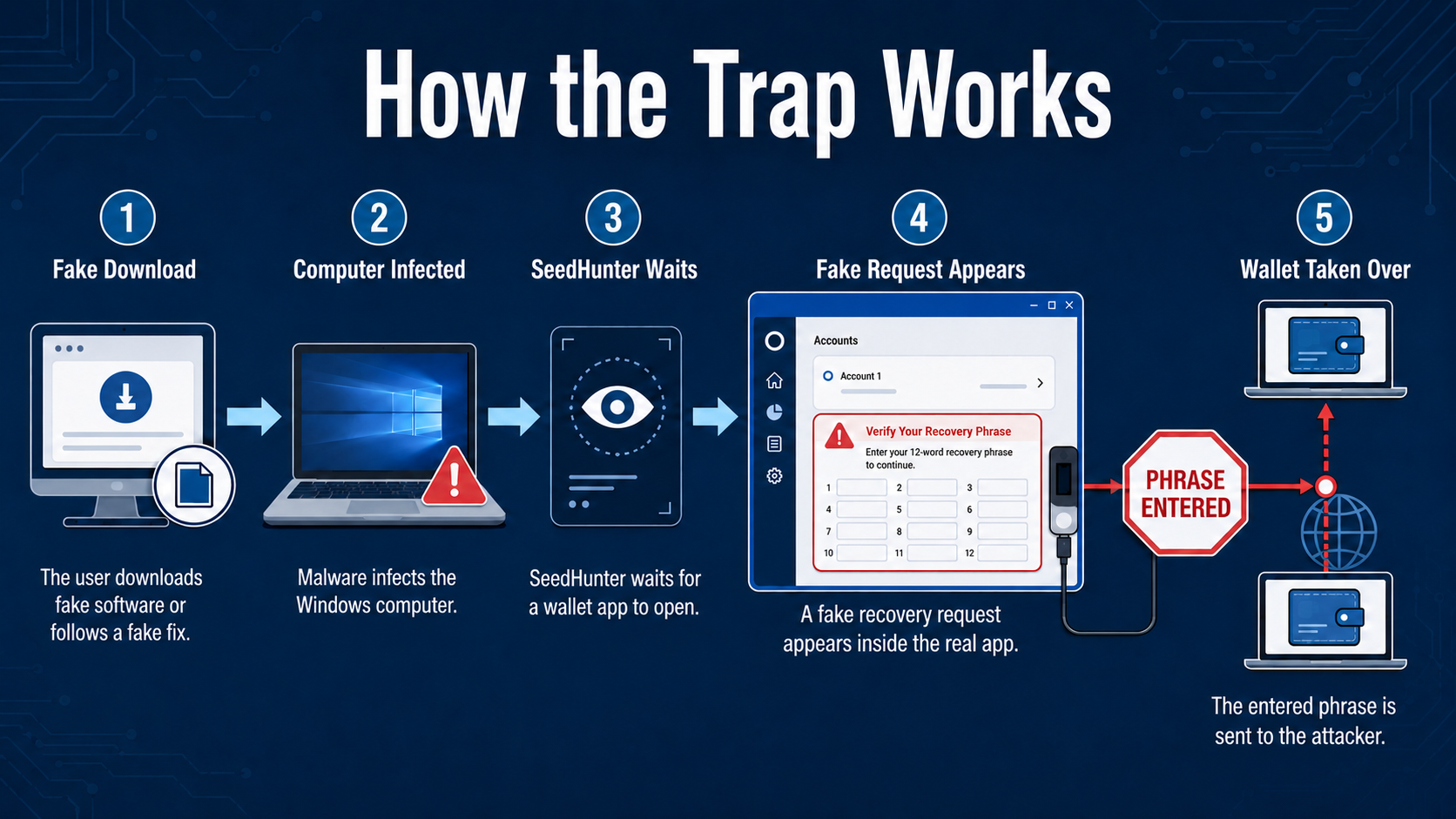 A request can appear inside a real application and still be fraudulent. --- ## Is the hardware wallet actually hacked? Not necessarily. The hardware wallet may still be doing its job: keeping the private keys inside the physical device. The malware is instead targeting the Windows computer and the person using it. Think of a hardware wallet as a secure vault. OkoBot does not necessarily drill through the vault. Instead, it places a convincing message beside the vault that says: *“For security reasons, please write the master combination here.”* If the owner follows that instruction, the attacker no longer needs to break the vault. This exposes an important limitation of hardware wallets: ***they can protect private keys from being extracted, but they cannot prevent every form of deception.*** A hardware wallet cannot fully protect you if you: - Type your recovery phrase into malicious software - Approve a transaction without reading the device screen - Ignore differences between the address on the computer and the address on the hardware wallet - Install untrusted applications on the computer used for crypto - Store the recovery phrase as a photograph, note or cloud document Hardware wallets remain valuable security tools. But owning one does not automatically make every action safe. *A hardware wallet protects keys. Good security habits protect the person controlling those keys.* --- ## How should crypto users stay protected? The strongest defense is to establish rules before a warning or emergency appears. ### Rule 1: Keep the recovery phrase offline Do not store it in: an email, cloud storage, screenshots or photographs, computer documents etc. Store it physically in a secure location, using paper or a durable backup material where appropriate. ### Rule 2: Never follow an unexpected recovery request A wallet application should not unexpectedly need your full phrase during ordinary activities such as: checking a balance, receiving crypto, sending a transaction, installing an application, updating portfolio information, etc. If a recovery request appears unexpectedly, stop. Disconnect the wallet and investigate from a different, trusted device. ### Rule 3: Read the hardware wallet’s screen Before approving a transaction, verify the important information on the physical device: destination address, amount, network, token, contract interaction. The computer screen can be manipulated. The hardware wallet’s screen should be the final place where the transaction is confirmed. ### Rule 4: Separate crypto activity from general browsing When possible, use a dedicated or carefully controlled computer for managing meaningful crypto holdings. Avoid using that machine/device for: downloading experimental software, pirated applications, random browser extensions, opening unsolicited attachments etc. ### Rule 5: Use official sources, but understand their limits Download Ledger and Trezor software through official channels. Verify the website carefully and keep the application and operating system updated. However, remember that an official application cannot make an already infected computer trustworthy. Security depends on the complete environment: ***device, computer, software and user behavior.*** [](https://cryptostoicmedia.com/) --- OkoBot introduces a more deceptive form of crypto theft. The attacker does not simply send a suspicious email or create an obviously fake website. The fraudulent request can appear inside the software the user already knows and trusts—and may wait until a real hardware wallet is connected. That is why visual familiarity is no longer enough to prove that a request is legitimate. Crypto users need a clear line that no application, technical problem or support interaction is allowed to cross: > Your recovery phrase does not belong on your computer. A hardware wallet is an important security layer, but it is not a substitute for careful behavior. Its protection remains strongest when the recovery phrase stays offline, software comes from trusted sources and every transaction is verified on the physical device. No urgency. No blind approvals. No recovery phrase entered into an unexpected prompt. SeedHunter has been identified, and its currently still active. You can read the technical breakdown [here](https://securelist.com/okobot-framework-targets-cryptocurrency-wallets/120660/).